
Automatic video editing · for a brighter story
Create stunning videos
automatically.
Add your images, videos and voiceover — Tithra does the rest. It cuts on the pauses in your voice, moves the camera on every still, writes the captions from your script and grades the whole film. Then it hands you the timeline.
Windows 10/11 · Works offline · No watermark · No login
▶ Watch a full video being edited
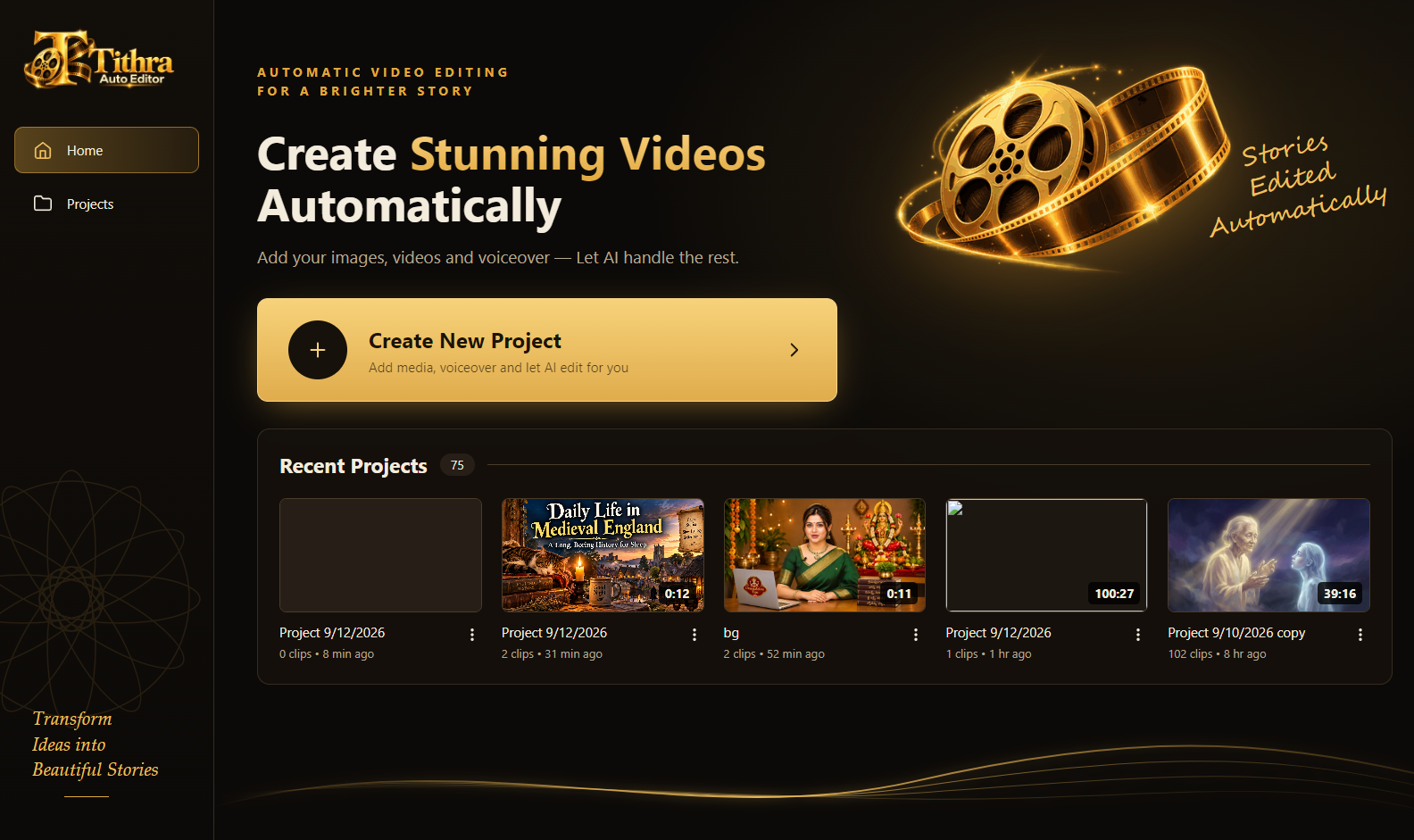
Every project stays on your PC and opens again in one click
Most channels do not stop for want of ideas.
They stop because editing eats the week.
A 40-minute video takes a 10-hour day. Twice a week, and you are done by week six. Tithra gives that day back.
Cuts on the pauses
It hears where you breathe and changes the picture there — never in the middle of a word.
Not a slideshow
Every still becomes several shots — a push in, a pan across, a pull out. 70 images carry a 50-minute video.
Fits the audio exactly
The picture is fitted to your recording, so the video never runs short or long.
Unlimited AI voiceover — at no cost
Tithra edits to your voice. If you would rather not record one, we show you the exact site we use for unlimited AI voiceovers — free, no trial, no watermark. A short video walks you through the whole setup. It comes with the app, at no extra cost.
Watch the free voiceover video🔒 Unlocked the moment you buy Tithra Auto Edit — no extra charge.
EVERY UPLOAD IS COSTING YOU A FULL DAY
Ten hours of dragging, nudging and typing — for one video.
How it works
Three steps. That is the whole app.
Drop in your media and your voice
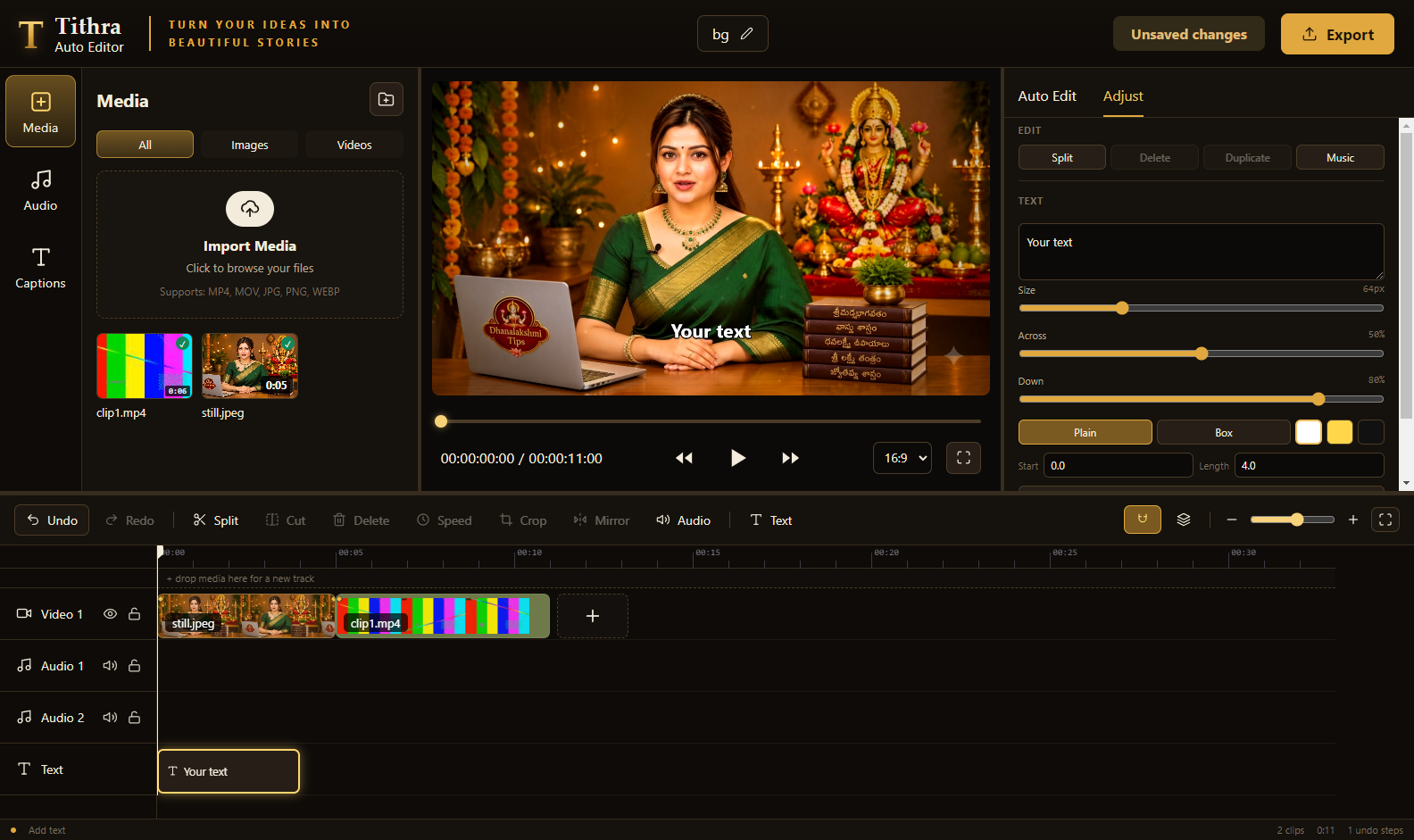
Images, clips and your voiceover go into the Media bin. Nothing is uploaded anywhere — it all stays on your machine.
- JPG, PNG, AVIF, WEBP, MP4, MOV and more
- Your voiceover as MP3 or WAV
- Background music, ducked under the voice automatically
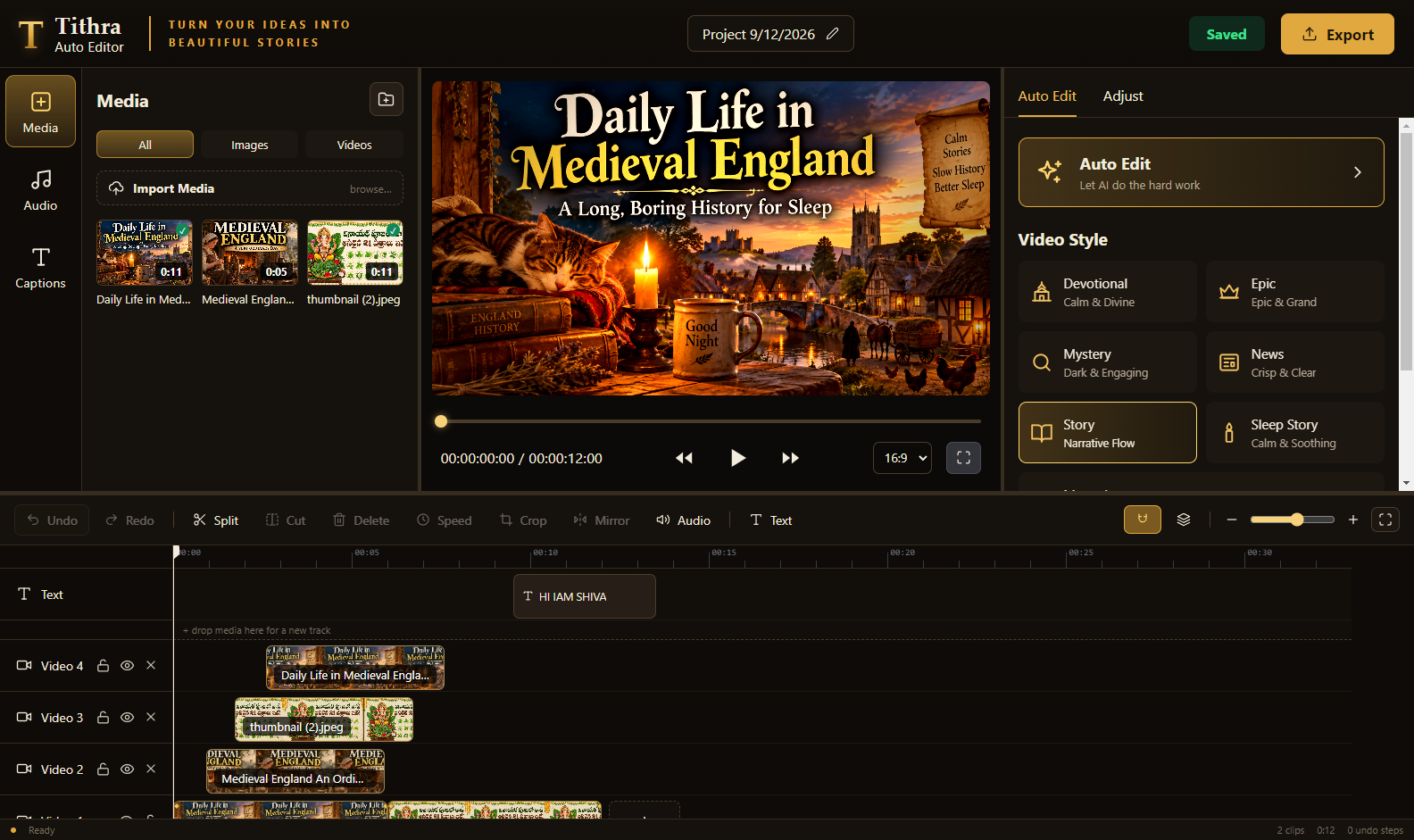
Pick a style and press Auto Edit
Seven styles, each with its own pacing, transitions and colour grade. The whole video is cut in that style — and you can re-cut it in another one any time.
- Devotional, Epic, Mystery, News, Story, Sleep Story
- Manual — no effects at all, you cut it yourself
- 16:9, 9:16 and 1:1 from the same project
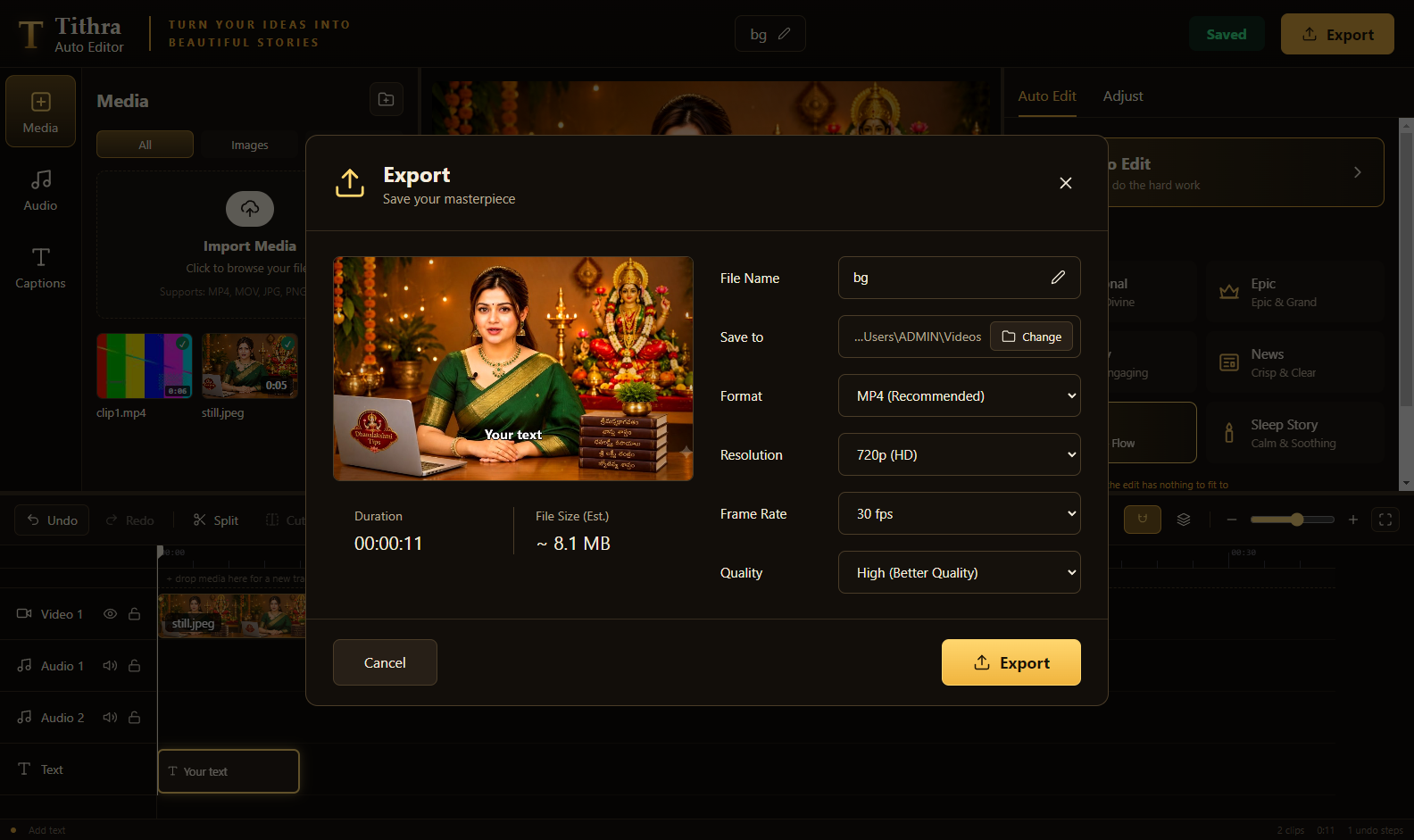
Export — the size is known before you start
Choose the file name, the folder, the resolution and the frame rate. Tithra shows the duration and the estimated file size before it begins.
- MP4 at 720p, 1080p, 1440p or 4K
- 24, 25, 30 or 60 fps, with a quality preset
- Hardware encoding where your GPU supports it
Styles
Seven looks, one click
Pick one and the whole video is re-cut in that style — pacing, transitions and grade together.
Devotional
Calm & divine — slow, warm holds.
Epic
Grand — long pushes, deep contrast.
Mystery
Dark & engaging — fast, tense cuts.
News
Crisp & clear — brisk and neutral.
Story
Narrative flow — balanced pacing.
Sleep Story
Very slow — for videos people fall asleep to.
Manual
No effects at all. You cut it yourself.
16:9 · 9:16 · 1:1
YouTube, Shorts, Reels and square — switch any time.
Captions & text
Captions from your script — not from guesswork
Other tools listen to the audio and mis-hear names. Tithra reads the script you already wrote and aligns it to the voice, so spellings stay exactly as you typed them.
- Telugu, Hindi and English — detected from your script
- Burnt into the video and exported as .srt
- The spoken word lights up as it is said
- Your own text anywhere on the picture, on its own track
When you want the wheel
A full timeline, not a black box
Auto Edit gives you a finished starting point. Everything after that is yours.
- Split, cut, trim, delete, duplicate, speed, crop, mirror, keyframes
- Unlimited video layers — drop media above a track to make a new one
- Voice clean-up and −14 LUFS, the level YouTube expects
- Auto-saves as you work — a crash costs you nothing
What you get
Everything above — worth ₹5,999
One app, every feature unlocked. Nothing held back for a higher tier.
- The Auto Edit engine — a finished video from one voiceover₹2,000
- 7 cinematic styles + 16:9 / 9:16 / 1:1 framing₹1,200
- Script-accurate captions in Telugu, Hindi, English + .srt₹1,000
- Full timeline editor — unlimited layers, keyframes, text tracks₹900
- Audio mastering — ducking, voice clean-up, −14 LUFS₹500
- 4K export, no watermark, fully offline, updates for this version₹399
Launch price ends in
15MIN : 00SECWho is this for?
If you narrate and the pictures do the rest, this was built for you.
Faceless channels
Story, mythology, history, facts — voice plus images.
Sleep & calm channels
Long videos where the pacing has to stay slow and even.
Shorts & Reels creators
The same project, re-framed to 9:16 in one click.
Small studios
Cut the first pass in minutes, spend the time on polish.
⚡ Launch price
One payment. Yours to keep.
This price ends in
15MIN : 00SEC- Tithra Auto Edit for Windows 10/11 (64-bit)
- Every feature on this page — nothing locked behind a tier
- No subscription, no watermark, no login, no upload
- Updates for this version
- FREE BONUS: the unlimited AI voiceover site we use
Write to us and we refund it. No forms, no questions.
Pay by UPI just below — card checkout is on its way.
Pay by UPI
Scan, pay ₹999, and your key is sent
GPay, PhonePe, Paytm — any UPI app. The card checkout is being set up; this works today.

Paying from this phone? Take a screenshot of the code, open GPay / PhonePe / Paytm, tap Scan and pick the screenshot from your gallery.
- 1Pay ₹999Scan the code above and enter ₹999.
- 2Send us the screenshot on WhatsAppOne tap — the message is already written, just attach the screenshot and type the email you want the key on. Send on WhatsApp Prefer email? [email protected]
- 3Your key arrives by emailUsually within a few hours — with the installer link and the free bonus.
Paid and heard nothing? Message us on WhatsApp or write to [email protected] with the payment screenshot — we will sort it out the same day.
What you need
- Windows 10 or 11, 64-bit
- 8 GB RAM or more for long videos
- A GPU helps — export uses hardware encoding where available
- Your own voiceover file and your own images or clips
What it does not do
- It does not write scripts or generate voiceovers
- It does not generate images or stock footage
- It does not upload anything to YouTube
Is ₹999 the final price?
It is the launch price. The regular price is ₹5,999 and this page carries the offer while it lasts. What you pay once is yours — there is no renewal.
Do I need internet?
No. Tithra Auto Edit runs entirely on your PC. Your footage never leaves your machine.
Is there a watermark?
No. The exported video carries nothing of ours.
Which languages do captions support?
Telugu, Hindi and English. The language is detected from the script you paste, and you can override it.
What formats can it export?
MP4 (H.264) at 720p, 1080p, 1440p or 4K, at 24, 25, 30 or 60 fps, with a quality preset. You choose the file name and folder before exporting.
Can I still edit by hand?
Yes — the whole timeline is editable, and the Manual style applies no effects at all.
Is it a subscription?
No. One payment for Windows.
Tithra Auto Edit bundles FFmpeg, used under the GPLv3 licence, to mux audio and video.
Wait — are you sure?
You are leaving with the ₹999 launch price still on the table 👇
- ◆ The Auto Edit engine — a finished video from one voiceover (₹2,000)
- ◆ 7 cinematic styles + 16:9 / 9:16 / 1:1 (₹1,200)
- ◆ Script-accurate captions, 3 languages + .srt (₹1,000)
- ◆ Full timeline editor, unlimited layers (₹900)
- ◆ Audio mastering for YouTube (₹500)
- ◆ 4K export, no watermark, offline (₹399)
- ◆ FREE: the unlimited AI voiceover site we use
The bonus comes with the app
The unlimited AI voiceover video is part of your purchase — not a separate product.
- ① Buy Tithra Auto Edit for ₹999
- ② Your email arrives with the installer, your licence key and the bonus video link
- ③ Open the video and set up unlimited AI voiceovers the same day
Access is sent to the address you buy with — you do not have to ask for it.
Buy now and unlock it — ₹999Already bought it? The link is in your licence email — or write to [email protected].